Tuesday, 19 February 2019

How to Export iMessages from iPhone to PC/Mac 2019


How to Export iMessages from iPhone to PC/Mac?
Method 1: Export iPhone Messages to Mac by Text Message Forwarding

The first method we will discuss is how to forward text messages to transfer iMessages from iPhone to MacBook. To begin with, your iPhone must have iOS 8 or later versions. Also, your Mac must have OS X Yosemite or later versions already running. Sign in both of them to iCloud using your regular Apple ID. After this, follow the steps below to set up text message forwarding.

Here is how to transfer your iPhone text messages to your MacBook Pro/Air:

Step 1. Go to your iPhone Setting and click on Messages.

Step 2. Click on Send & Receive.

Step 3. Check to see if the Apple ID you indicated is the same Apple ID being used for iMessage.

Step 4. In the box, check phone number and your email under "YOU CAN BE REACHED BY IMESSAGE AT".

Step 5. Go to your Mac and open the Messages app.

Step 6. Click on Messages on the menu bar, and click on Preferences.

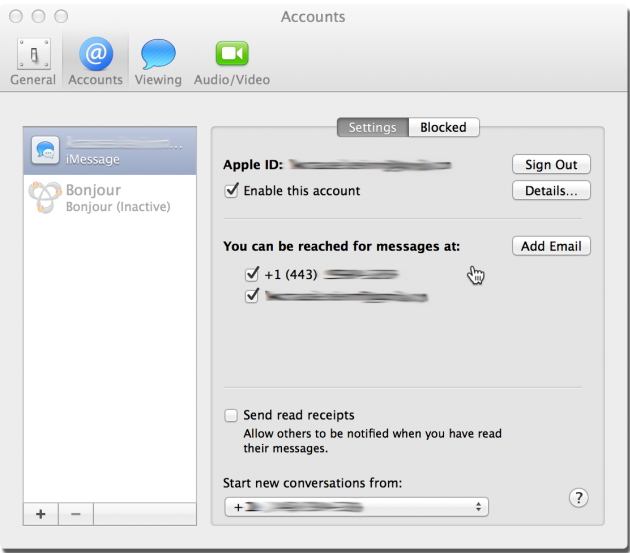
Step 7. Locate the Accounts tab and click, then choose your iMessage account.


Step 8. Go to "You can be reached for messages at" and check both phone number and email addresses.Sponsor ads:

send anonymous text message from computer for free

Must Read:If you lost data after you updated to a new iPhone, you can always use Gihosoft iPhone Data Recovery to get the data back from the old iPhone or backup.

Gihosoft Free iPhone Data Recovery:iphonerecovery.com

If you use android phones, please choose Gihosoft Android Data Recovery

Step 9. Go back to your iPhone and click on the Settings app, then Messages. Click on Text Message Forwarding (make sure your computer switch is on). Finally, enter the verification code sent to your computer.

That is it. From that moment, all your iMessages and other text messages will appear on your computer as well as your iPhone.

However, the solution only works for those who have Mac computer. If you are using Window computer, this method will not work for you. Therefore, you will need a method that can help you to export iMessage conversation from iPhone to both Window and Mac computer. And that brings us to the second method – exporting with iMyFone D-Port.

Using Cloud Service to Add Music to iPhone without Syncing 2019


Using Cloud Service to Add Music to iPhone without Syncing

This is another method to transfer your music, and you can do it using a few different apps.
Step 1: Download an app to your iPhone that allows cloud storage and make an account with the service. For example, Dropbox works well.
Step 2:Log onto your account in www.dropbox.com from your PC and upload your music to the cloud.
Step 3: Go back to your iPhone and get on the cloud app that you downloaded (for example, Dropbox). Log into your account and download the files that you uploaded from your computer.
As you can see, this is a roundabout way to do things. One of its limitations is that you need to install additional app on your iPhone. Also, you will need an Internet connection to make it work, preferably WIFI. Music cannot be downloaded to Music app and you need to go through Dropbox to access the songs.
Transfer Music to iPhone Without Syncing
Out of all of these methods, you can probably clearly see now that TunesMate is the easiest, most efficient, and fastest method to add music to iPhone without syncing.Sponsor ads:
Gihosoft Free iPhone Data Recovery:iphonerecovery.com
Free iPhone Data Recovery Software for Windows/Mac
Recover up to 12+ types of files, including contacts, SMS, photos, WhatsApp, Viber, notes, etc.
Restore lost data from iOS devices directly or from iTunes and iCloud backup
Recover iPhone data lost due to iOS upgrade/jailbreak, accidental deletion, device lost or broken
Support all the latest iPhone, iPad and iPod Touch
Both Free and Pro version.
If you lost data after you updated to a new iPhone, you can always use Gihosoft iPhone Data Recovery to get the data back from the old iPhone or backup.
Worth reading:download youtube 1080p
If you use android phones, please choose Gihosoft Android Data Recovery
Jihosoft Android Data Recovery: the best Android Data Recovery software for Windows and Mac to recover deleted contacts, messages, photos, videos, WhatsApp and etc from Android

Wednesday, 8 August 2018

7 Best Free Yoga Apps for Android 2019


7 Best Free Yoga Apps for Android 2019


Yoga is an ancient art where you through poses, you enhance your physical, mental, and spiritual state. Recently, Yoga has started to reach everywhere, throughout the world and people have started recognizing the value yoga has on our daily lives. The 21st of June is even recognized as World Yoga Day.


The number of yoga practitioners in America has gone up from 20.4 million in 2012 to almost 37 million in 2016. This number is expected to grow even further and reach up to 55 million yoga participants by 2020. It’s easy to see why yoga is taking the world by storm: flexibility, stress relief, physical fitness and better health are just a fraction of its advantages.


The impact of yoga is visible in the world of mobile apps too as there are numerous ways to get involved.


Whether you’re an aspiring or a seasoned yogi, having your favorite yoga app on the phone is a delight you shouldn’t miss.


People all around the world started attending yoga classes and the costing of these classes went high. Yoga was never supposed to be a paid commodity and that is why, here, we are going to review 7 Best Yoga Apps for Android that will help you keep fit and healthy. Using these free yoga apps for Android, you can get the information about different yoga types and how to do it, sitting at home without even paying a penny. All you need is an exercise mat and a little space, that’s it. You are all ready to get cracking.


Here are the 7 Best Yoga Apps for Android in 2018
1. Daily Yoga – Yoga Fitness Plans


The Daily Yoga App gives you various different kinds of yoga poses or yoga asanas. There are more than 500 yoga asanas and more than 50 yoga class plans available as well. It helps you lose weight through yoga and has tips on how to sleep peacefully and also on how you can relax. This is one of the Best Free Yoga Apps for Android and has over 5 Million downloads on Google Play Store.


Main Features


Daily Yoga App has more than 500+ yoga asanas, 50+ yoga class plans, and 200+ yoga classes with video.


Has seven different languages to this yoga app like English, Japanese, Korean, Spanish, Chinese, German, and French.


Also, has various mediation and yoga-based soothing songs to help you relax.


Scheduled plans for boot camp, body toning, weight loss, strength, flexibility, relaxation, balance, meditation etc.


Google Fit support.
2. Yoga Studio: Mind & Body


Even though Yoga Studio App is not completely free, you can enjoy 2 weeks for a free trial and then decide if you want to enrol in it. The app is very easy to use and has a very simple design and all you have to do is, download the app to get started. In this yoga app, you can select different kinds of plans and yoga classes, which vary from Beginner, Advanced, and Intermediate.


Main Features


A unique addition called Hip Hop Yoga.


Video Tutorials of yoga and meditation classes in full HD Resolution.


280 yoga poses with detailed advice and instructions.


Be fit and healthy with the daily and weekly class scheduling feature.


Track your fitness goals with daily, weekly class scheduling.
3. Yoga – Poses & Classes


Yoga – Poses & Classes is one of the great free yoga apps available for Android users. It has HD videos of all the yoga asanas. You can search for asanas that will help improve a certain part of your body, like focus, ability, etc. This app has the option of choosing the time of each class from 10 mins to 30 mins.


Main Features


Allows you to create unlimited custom classes that have full videos on it.


Allows you to focus on flexibility, strength, and balance.


111 Poses developed and thought by qualified yoga instructors.


Allows you to play your classes on your Smart TV through AirPlay or Chromecast.
4. 5 Minute Yoga


5 Minute Yoga is a perfect yoga app for your busy schedule. This app utilizes only 5 mins of your time and allows you to keep your mind and body fit and healthy. It is very easy to use and has videos to let you see the yoga asanas and practice alongside. Each session of this free yoga app takes less than 5 minutes and keeps you salubrious as well. 5 minute yoga is considered as one of the best yoga apps for Android as well as iPhone users.


Main Features


Minute sessions allow you to do yoga at any time.


Free Yoga App with pose tutorials.


Regular yoga practices that focus on improving flexibility, strength, toning muscles, and helps in reducing stress.


The best yoga asanas put together to get you the maximum output in just 5 minutes.
5. Yoga for weight loss – Lose weight program at home


Yoga for weight loss is a great Yoga app for Android which focuses on burning that excess fat chunks in your body. With over 50 yoga poses which are optimal for weight loss, this free yoga app brings you an amazing set of plans to reduce your weight and helps you stay healthy and also fit and stress-free.


Main Features


Has a notification system which reminds you to exercise and plan your weight loss, so you won’t miss a session.


Has a virtual coach which will show how to do the yoga asanas perfectly.


Free Yoga Tutorials with pose images.


Different difficulty levels in your training help you pick among vary fat loss programs.
6. Yoga daily fitness – Yoga workout plan


This is one of our favourites, it has an amazing look and feels to it. Yoga Daily Fitness App is a very simple and easy to use Free Yoga App and has step by step instructions on how to practice and do exercises. It helps you improve your flexibility, muscle strength, protect your spine, increase blood flow, helps decrease stress and helps you focus, etc.


Main Features


You can set reminders to let you know when you have scheduled your session.


Has a 30-day yoga plan with video as well.


It has a couple of soothing music to help you relax while you do yoga and fitness.


Plan daily yoga sessions to keep your mind and body fit.
7. Down Dog: Great Yoga Anywhere


This is a unique and different app for yoga fitness. It shows you poses of yoga with a video which describes the poses from an animal perspective and helps you realize the usefulness of that pose. You can set new routines every day and can customize your fitness regime based on what type of yoga you want to do. Down Dog is one of the Best Free Yoga Apps and has over 500,000+ Android users.


Main Features


Video feature to it showing the animal side of the poses.


Daily Fitness planner allows you to plan your daily yoga sessions.


Gives personalized workout and changes it every now and then to keep you interested in the workout.


Free Yoga Tutorials.
Conclusion


These 7 apps are the top and the Best Yoga Apps for Android available to you for free. After you use them you can be sure to find out that the health and fitness of your mind and body are all in order. Doing yoga can help you keep away a lot of different diseases as well. So, download these apps, try it, because we are sure that you will choose one of these apps to be your yoga fitness instructor.


Which Yoga Apps are you using in your Android Smartphone? Do share with us in the comments.


Jihosoft Android Data Recovery is the most powerful and professional data recovery software for Android that can restore deleted or lost contacts, photos, videos, audios, SMS, call logs, WhatsApp chat, Viber messages from any Android devices due to accidental deletion, virus attack, formatting. It supports all popular Android smartphones and tablets like Samsung, HTC, LG, Huawei, Motorola, Nexus, etc. In the meantime, you will be guided step by step if you never used this kind of tool before.


Best Samsung Data Recovery Software:
Easily Recover Deleted/Lost Photos, Messages, Contacts, Call Logs, WhatsApp,
Musics, Videos etc. from All Samsung Devices


Must Check Out Posts:


10 Solutions to Fix Windows 10 Does Not Recognize Android


Transfer WhatsApp Messages between Android and iPhone


What is the Best Keyboard App for Android in 2018


Best Screen Recorder Apps for Android


How to Record WhatsApp Call on Android?


How to schedule WhatsApp Message on Android and iPhone


If you liked this article, don’t forget to share it with your friends on Facebook or Twitter.
Friday, 3 August 2018

7 Free And Best Android Backup Apps Of 2018-2019

7 Free And Best Android Backup Apps Of 2018-2019

Top 7 Free And Best Android Backup Apps Of 2018-2019

1. App/SMS/Contact- Backup & Restore

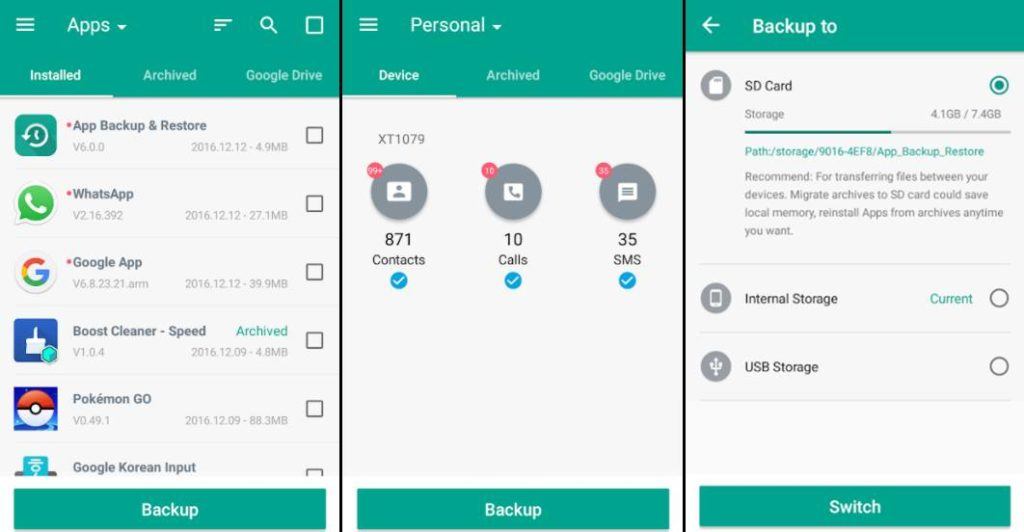
App/SMS/Contact- Backup & Restore has a variety of features for backup and restore. It permits you to batch backup, restore, transfer, and share your apps and personal data. You can backup your files to the Google Drive or edit the backup path to store data on your SD card. It has an option for auto-backup that allows you to backup every app installation update automatically.
Moreover, it has a built-in virus scanner, APK files scanner, night mode, and you can also sort your apps by name/date/size. However, the app cannot backup, restore, or transfer data and settings of the apps. The app is free and contains ads.

2. G Cloud Backup

G Cloud is an impressive Android backup app where users need to create an account to store the backups. It provides 1GB of backup space for free. It allows you to save your SMS, call logs, contacts, system settings, photos, videos, and music. You can easily move your files to a new device and also protect personal apps with a passcode. It does not require root privileges or any unique configuration, and even allows backups to external SD cards. You can schedule automatic backups and upload whenever there is a WiFi connection. The app is free, contains ads and in-app purchases.

3. Super Backup & Restore

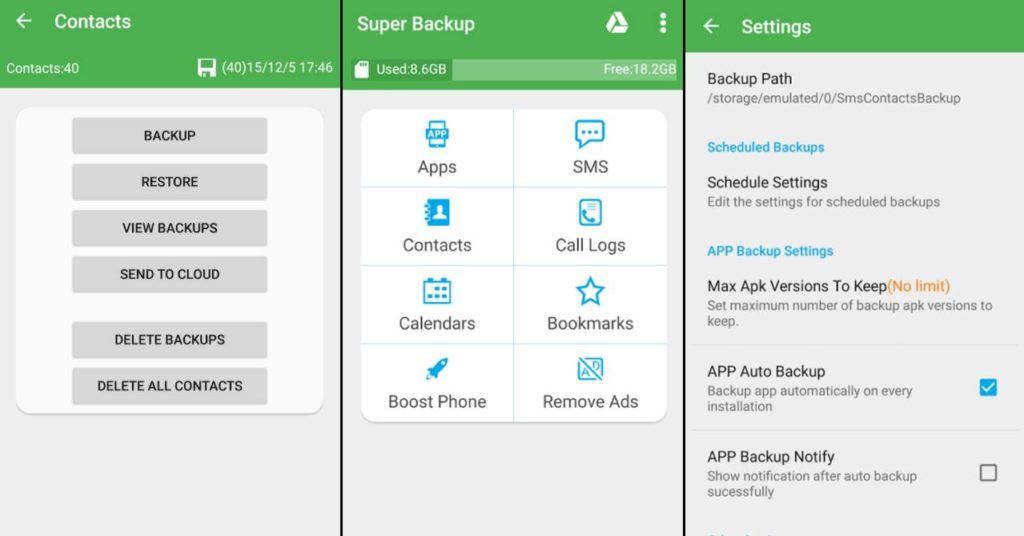
Super Backup & Restore claims to be one of the fast backup and restore tools for Android. It enables you to backup your apps, contacts, messages, call history, bookmarks, and calendars to your SD card or Google Drive. You can also backup and restore your app’s data. But for that, you need to root your device. Moreover, you can schedule automatic backups. It can also auto-upload scheduled backups to your Google Drive or Gmail. The interface is easy to operate and comes with customizable dark or white theme. The app is free, but the ads can be annoying. There is also a pro version of the app that is ad-free.

4. Google Drive

It is a free massive cloud storage service from Google that provides basic storage of 15GB which is enough to store your photos, files, and other documents. You can access your virtual Google hard drive from any device no matter on which platform you are. It also allows you to view your files offline just using simple procedures. Moreover, you can share your files and folders with others and also edit or add comments on any of your files. It is definitely one of the best Android backup apps that can store your information securely in the cloud.

5. App Backup and Restore- Easiest backup tool

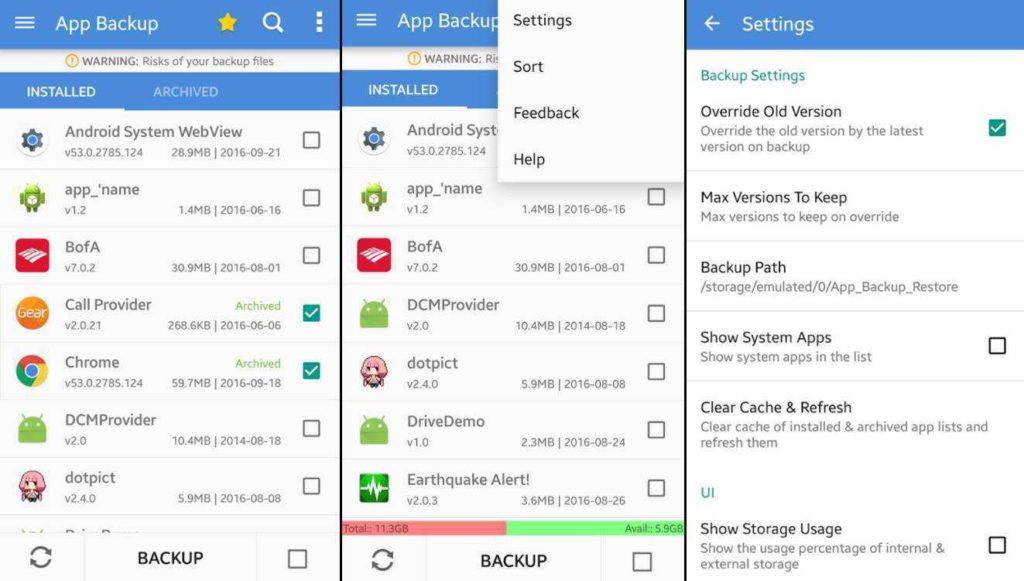
This is a reliable and straightforward Android backup and restore app. It allows you to store, archive, or delete backups directly from the main interface. You can batch backup and restore your files, and also set the backup path to your SD card. It has a built-in APK file scanner and virus scanner. Also, you can choose to auto-backup specific apps instead of all apps. Moreover, you can share apps between devices through WiFi and Bluetooth. The app, however, only allows you to backup and restore your APK files, without your application data. It is free and contains ads.

6. Titanium Backup

Titanium backup has been a solid backup app since the early days of Android. It is exclusively for root users and supports almost all Android versions. The app is ad-free and available in both free and premium version. With the free version, you can backup and restore apps along with the app data, SMS, contacts, etc. It also supports backup to SD card. The premium version provides some extra features like syncing to cloud storage, automatic backup, batch restore, app freezer, etc. Overall, the app is quite excellent and worth a try.

7. Contacts Backup & Restore by Simpler

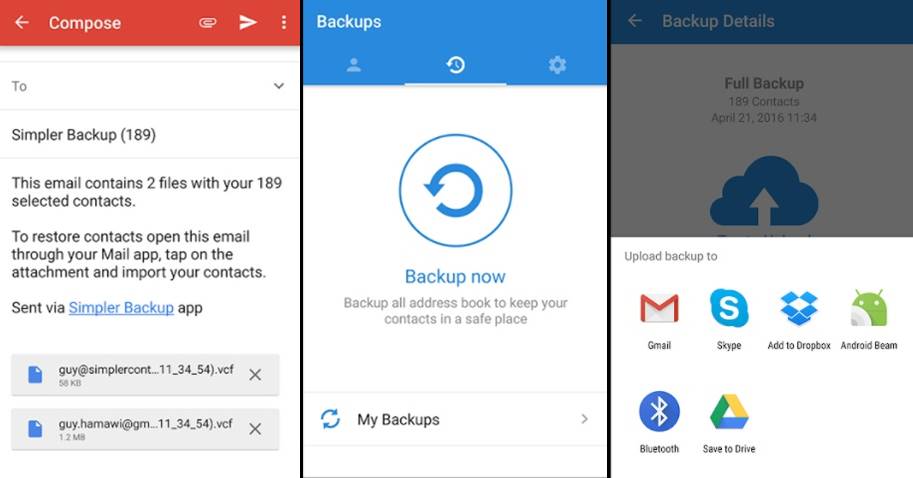
If you’re searching for the best Android contacts backup app, Simpler backup is a straightforward app that does what the name says. It allows you to backup your contacts as a VCF file and works even in offline mode. You can export your backups to DropBox, Google Drive, or SD card. You can also move your contacts between different accounts. Overall, the app is quite basic and easy to operate. It is free with no ads or in-app purchases and is also available in 15 different languages.
If there are no available backup for deleted or lost WhatsApp messages, you can recover deleted WhatsApp chat history ( including messages, photos, videos, audio files and other attachments) from Android by using Gihosoft Free Android Data Recovery. It’s a professional Android file recovery software that enables you to deep scan and one-click recover all deleted or lost WhatsApp chat history from Android quickly.
Ads:
Gihosoft Total Video Converter is a professional all-in-one video tool that enables you to convert videos and audios into various different formats. You can also download videos from YouTube or other online video sharing sites and convert them easily. Plus, you’re able to personalize your videos with its inbuilt editor, such as, trimming, cropping, applying video effects, adding watermark, subtitles, and more. If you need a powerful and professional desktop video converter program, just download Total Video Converter and follow the step-by-step guide here to have a try.